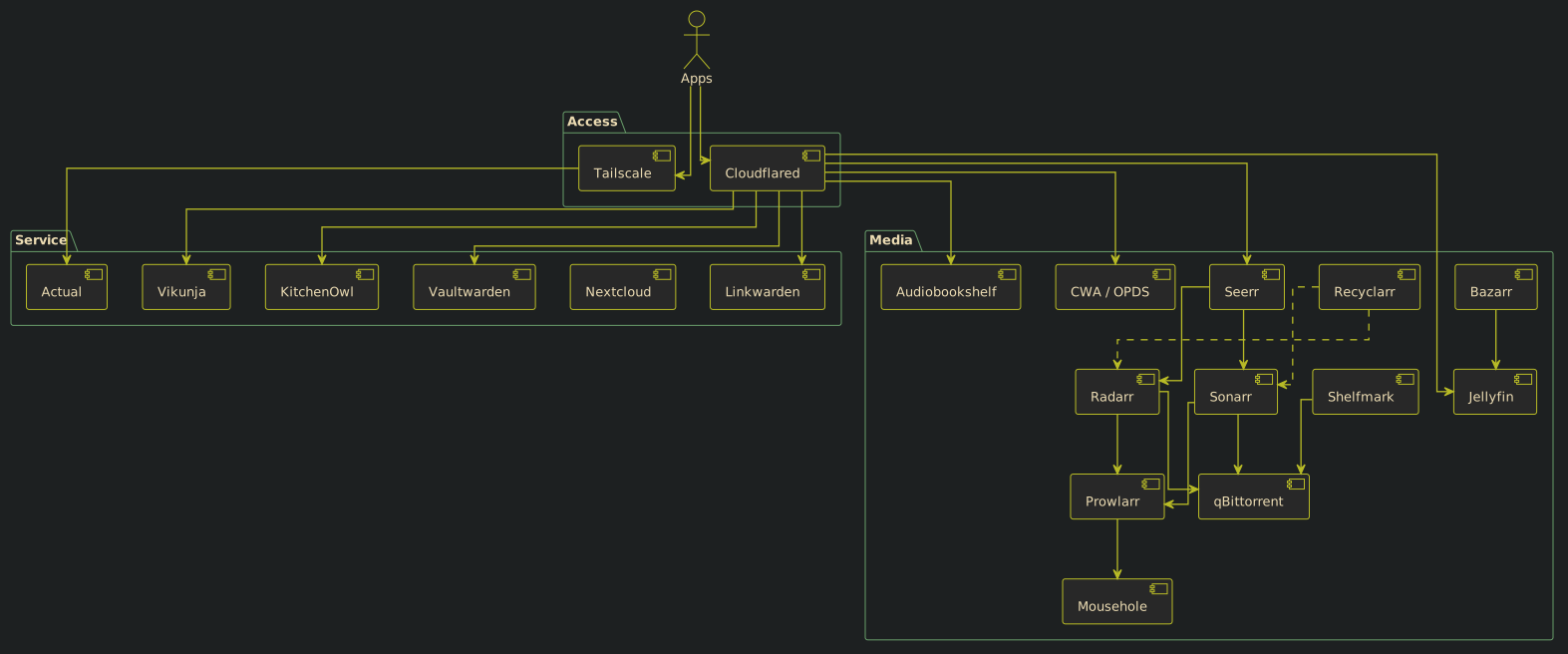
Disclaimer: I've use OpenAI's Codex to proofread and to help me with the diagram. But all the content come from me.
- 2026-07-18: I've added KitchenOwl to the setup to help with recipes and managing the grocery list
Introduction
Multiple people asked me about the architecture I have at home for my NAS/homelab setup. So I thought I would share a bit of the idea behind it, and then the architecture itself.
I won't talk too much about the tech or how it's all wired up. Most people probably won't use exactly what I did, but they might want to replicate the services that I have set up.
Design
So when I started to build my homelab, there were a couple of motivations:
- Most of the time I'm very cheap and I don't like to pay for stuff. Sometimes I think it's too pricey, or I want to try before paying, but more often than not it's mostly just to pirate it. As to why I'm like that, you're free to believe whatever you want.
- I don't like having to deal with multiple platforms. Sadly, modern-day capitalism doesn't do a very good job of grouping your content, or allowing you to group your content, onto a single unified platform that's supported on different devices and operating systems. They are all in silos and have proprietary protocols that don't play well with others (https://notnotp.com/notes/use-protocols-not-services/).
- I wanted to be in control of the content I bought. Another issue with modern capitalism is that it behaves in the spirit of "You'll own nothing and be happy", which is not my preference. So I'd rather have something at home.
So what I wanted was this:
-
I wanted to download and consume media content such as:
- Ebooks
- Audiobooks
- Movies and TV Shows
-
I wanted to have services such as:
- Password manager
-
Link aggregator
- I have a hoarding problem for links :/
- Accounting services, mostly to know if I spend too much
- Kanban board
- Something to manage all those services (updates, shutdowns, etc.)
- Something to give me visibility into those services' states
At least for the moment, that's what I'd like to have, and I don't want to rely on big tech for it. So I'll split the design into two sections. The first is media, where I explain how I find, download, and consume it. The second is services, which covers what I use and how.
Media
Configuration
So it starts with Prowlarr and Recyclarr.
-
Prowlarr is the indexer manager. It essentially gives the "downloaders" access to the different websites they query to find torrents to download.
- Mousehole is for the MyAnonaMouse (MAM) private tracker. Since it's on a dedicated server, I need to specify that machine to the MAM infrastructure so they can track what I download and seed. It allows Prowlarr to always have access to MAM for downloading content.
- Recyclarr is what I use to synchronize the quality profile configuration across the different downloaders. That way, when they query the sites that have the torrents, they choose the right quality and properties.
Downloaders
- Radarr talks to Prowlarr to find the torrent and then gives it to qBittorrent to download. It always tracks the file so that I know when it's ready to watch.
- Sonarr is essentially the same thing as Radarr but for TV shows.
- Bazarr is essentially like Sonarr and Radarr but for subtitles. I don't think it uses Prowlarr; it has its own list of available servers to download subtitles from.
- Seerr used to be Jellyseerr, but it's now merged into just Seerr. It's a nice interface to request content, whether TV shows or movies.
- Shelfmark is essentially a Radarr/Seerr but for audiobooks or ebooks. As a word of caution, I just saw on GitHub that they stopped maintaining the service. So use it at your own risk.
- qBittorrent is the torrent client that runs as a service on the server and receives all the download requests from the downloader services mentioned above. It categorizes them based on which service made the request, and then moves them to the appropriate folder on disk.
Media clients
- Jellyfin is the media player for movies and TV shows. It's pretty simple and it also has an Android app that can download content locally (with the subtitles and everything) or allow you to stream it.
-
KOReader is for reading books. What I like about KOReader is that it can be used on Android, on some e-ink tablets, and on desktop. So when I did my post about Clean Architecture, I was able to see the book from my desktop with all the annotations and highlights.
- CWA is part of the KOReader setup. Normally it's a book organizer available through the web, but there are two important features that I use it for. The first is koreader-sync, which syncs reading progress between devices, and the OPDS catalog, which allows KOReader to use it as just a big library where you can download locally the books you want to read.
- annotation-sync is the counterpart of koreader-sync, which syncs the highlights and notes that you've added. It's useful when you want to understand what was important from your previous reading session on a different device. You'll need a WebDAV storage server, essentially a server that stores the different annotations for each book. I use Nextcloud for it.
- Audiobookshelf is the player for audiobooks. It connects to the server and you can stream or download the files. I like their Android app and I've listened to a lot of books that way. It's very nice to have when you have downtime where you can listen to something but can't really watch something.
Services
So for the services part:
- KitchenOwl is a recipe organizer and grocery list tracker. I was able to upload hundreds of recipes from different cookbooks and it allow me to easily track what I need and for which recipes.
- Actual is my budget tracker and I mostly just use it to see if I'm spending too much.
- Cloudflared is essentially my reverse proxy. What it does is connect my Cloudflare domain and subdomains to the different services. It adds an HTTPS layer, but only between you and the Cloudflared container. So technically the HTTP services are accessed internally, but everything else goes through Cloudflare HTTPS. That can cause issues with things like Actual, or if you want to use Headscale (self-hosted Tailscale), because they require some kind of encryption that doesn't work through that solution. It's not a big deal since I just access Actual through a service defined in the Tailscale network.
- Linkwarden is my link aggregation service. It has a Firefox extension, so it's easy for me to add links to read later. It's alright. There's also an Android app, which is nice. But I wish the search was a bit better. Whenever I search, I often don't find what I'm looking for. It also has retention if one site goes down; it'll keep a snapshot.
- Mousehole is just to keep MAM happy with my address so it allows me to seed and download through my server.
- Vaultwarden is my Bitwarden self-host. I decided to reduce the cost of my subscription with that, although it was just like 10$ a year. I wanted to have a bit more control over my password. I think I have around 250 entries + cards. I do a backup of it every night and test the backup every week.
- Vikunja is my kanban. It's essentially a glorified todo list service. It's just so I don't forget stuff and I'm able to track progress or take notes as to where I'm at. There's an Android app, which is not that good, but it's "usable".
Architecture
Here's essentially a diagram of how everything comes together and its configuration in my Nix config. Most boxes are links to the relevant NixOS module in my server target.